SIPOS 5 Flash commissioning runs on two completely different tracks: the PROFITRON (professional) version uses the display menu with PIN 9044, while the ECOTRON (economy) version uses DIP switches S1–S8 with H1/H2 indicator lamps — and the multi-turn 2SA5 has its own keying sequence. The three flows must not be mixed. SIPOS 7 menus are entirely different: the procedures below do not apply to SIPOS 7. Compiled and merged from two identical articles published by the Hot-Control Circle account.
| Actuator | Commissioning method | Section |
|---|---|---|
| SIPOS 5 Flash professional (PROFITRON, multi-turn 2SA5x) | Display menu, PIN 9044 | Part 2 / Part 4 |
| SIPOS 5 Flash economy (ECOTRON) | DIP switches S1–S8 + lamps H1/H2 | Part 3 |
| SIPOS 7 (EC7/PR7) | Graphic menu, different flow | Not covered here |
Preparation: open the signal-gear-unit cover, note the four buttons; wire up, power on, confirm the display is alive.
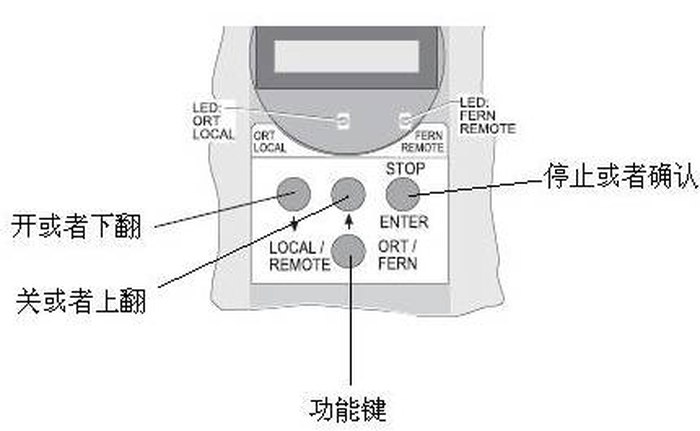
Menu entry: press the mode key until line 2 shows locPar → ENTER, line 1 shows language setting → down to commissioning → ENTER, enter PIN 9044 (change 0000 to 9044 with up/down keys) → ENTER; display shows close direction — you are in commissioning.
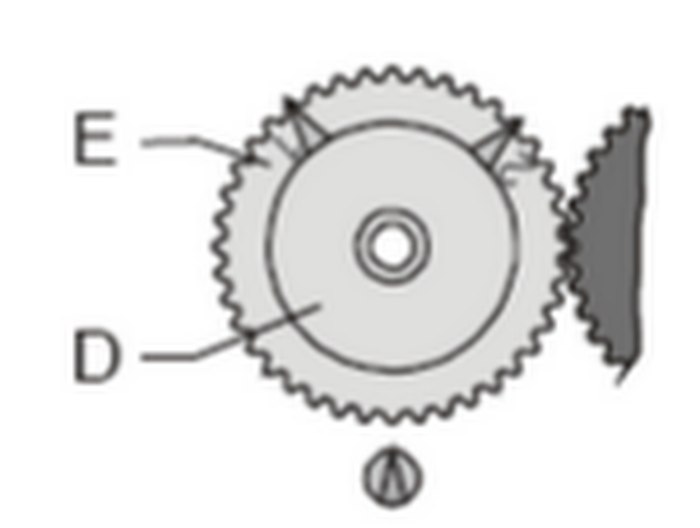
End positions (enter pos.adjust): down to enterpos.adjust → ENTER shows start with pos / OPEN → ENTER, move to op.pos, press the open button; display %open→open; note the direction of the white signal gear; the actuator stops at full open; tap the close button three times (back off a little to avoid jamming) → ENTER, adjust of poti with deviation+value — rotate the white gear in the observed direction until the value reads 0 (and stays 0 after release) → ENTER, move to cl.pos, run to auto-stop, tap open three times, ENTER → adjustment ok! means success.
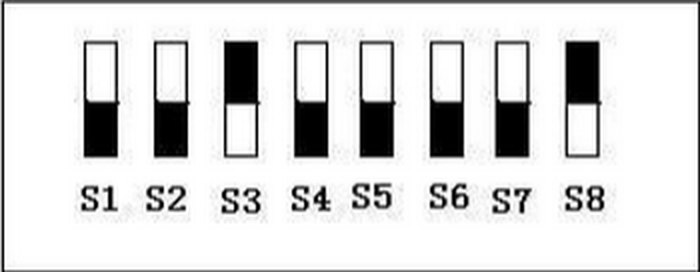
Switches S1–S8 (left to right): S1 rotation (CW default); S2 closing mode (down=torque, up=travel; default torque); S3 opening mode (up=travel); S4/S5/S6 per application, down by default; S7 step-confirmation; S8 first and last commissioning steps.
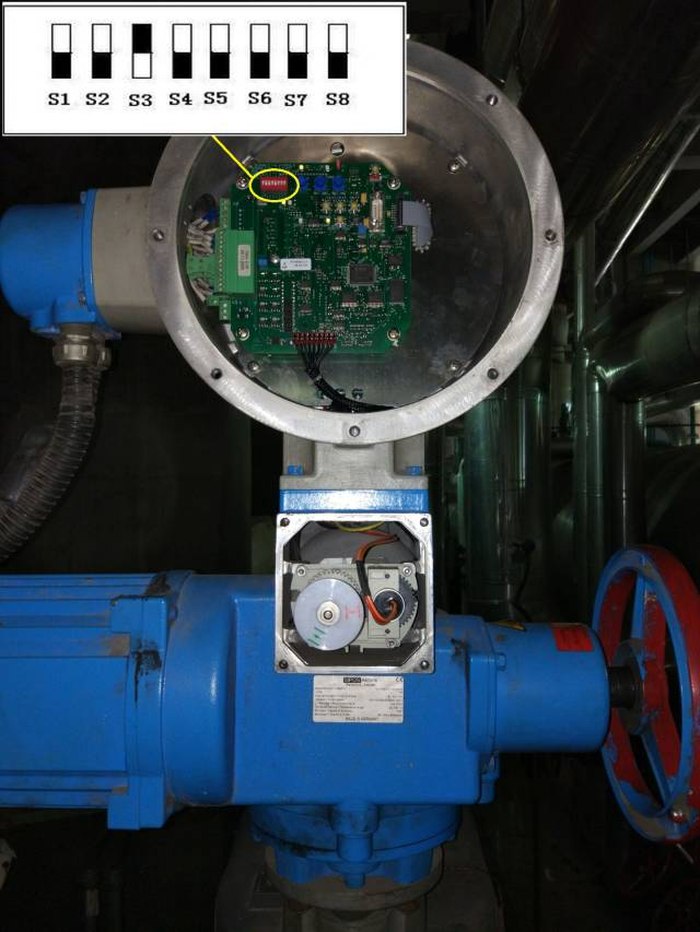
Flow: (1) S8 up;
(1) Connect 380 V AC; (2) Local/Remote button selects LocPar; ENTER opens the main menu; (3) down to commissioning, ENTER, display 0000; (4) enter PIN 9044 digit by digit; (5) close direction (clockwise / anti-clockwise), ENTER saves; (6) closing/opening speed settings, ENTER saves (repeat for emergency speeds); (7) down to endpos.adjust — if previously set, compl.new pos? appears; choose open-first or close-first: hold (≥2 s) the up key to run to the correct open end position, ENTER to stop; fine-trim with short (<2 s) presses, ENTER to confirm; deviation 0 = potentiometer calibrated; then close end: hold the down key, ENTER after ~2 s, sign. Gear ratio adjustment ok!; ENTER returns to the menu, Local/Remote switches to remote control — all confirmed changes are saved.
(1) The emergency speed setting (step 6 note) matters for ESD scenarios — confirm it while setting normal speeds; (2) the signal gear unit is the physical reference for 5-series feedback: a deviation that will not go to 0 usually means gear-mesh position — adjust the gear first instead of redoing the whole commissioning.
SIPOS 5 FLASH site commissioning: PIN 9044 and end positions · Analogue signal wiring notes · 18 field commissioning notes · Remote no-response case · SIPOS library, 202 files
For SIPOS 5/7 sourcing submit an RFQ.
Source: Hot-Control Circle, "SIPOS actuator commissioning & troubleshooting 1+1" (2023-12-03) and "SIPOS actuator commissioning & troubleshooting" (2023-12-10) — the two are identical; merged by actuators.cn; scope annotations added by actuators.cn.

An industry resource for electric & pneumatic actuators, dampers and heaters: brand manuals, sizing guides and maintenance know-how. Global brands in, China manufacturing out.