Rotork electric regulating dampers must have their stroke re-positioned whenever command and feedback diverge or after the valve body has been overhauled — one of the most frequent actuator jobs in power-plant maintenance. This article compiles a maintenance engineer's field procedure: using the Rotork Bluetooth setting tool to re-position IQ-series regulating dampers (main-menu password ROTORK → Settings → Limits, setting direction, seating method, torque value, then Set Limit), plus one analogue setting and three positioning-quality parameters (deadband / hysteresis / inhibit time). A record of the actual parameters of five Rotork dampers on a plant's Unit 1 boiler is included. All steps and values are reproduced from the field record.
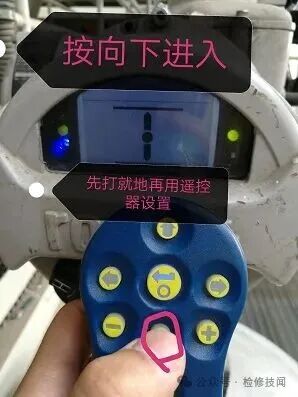
Turn the damper selector to LOCAL first, then aim the setting tool at the display and press "down" to connect (field photo)
The plant's Rotork electric regulating dampers serve forced-damper fan blade control, induced-damper fan blade control, primary-air fan blade control and the main feedwater bypass damper. Re-positioning is required when:
Positioning must be done jointly with the mechanical crew to confirm the true valve position, so the electronic position never detaches from the mechanical reality.
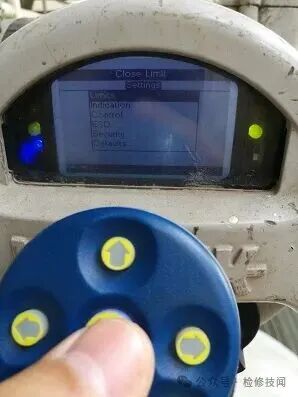
Settings → Limits menu: Close Limit on top, Open Limit below (field photo)
Procedure with the Bluetooth setting tool:
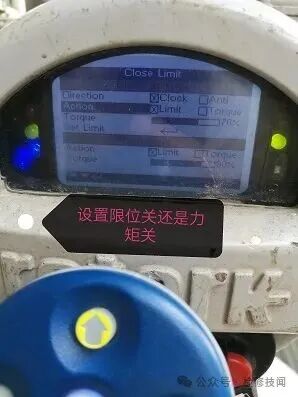
Close Limit screen: Direction, Action (limit vs torque), Torque value, Set Limit (field photo)
Table 1 Recorded positioning parameters, Unit 1 boiler Rotork dampers
| Damper | Seating | Direction | Deadband | Hysteresis | Inhibit time |
|---|---|---|---|---|---|
| Main feedwater bypass | Limit | Clockwise | 1% | 2% | 2s |
| Primary-air fan blade damper | Limit | Anti-clockwise | 1% | 2% | 0s |
| Forced-damper fan blade damper | Limit | Clockwise | 1% | 2% | 0s |
| Induced-damper fan blade damper A | Limit | Anti-clockwise | 1% | 2% | 0s |
| Induced-damper fan blade damper B | Limit | Clockwise | 1% | 2% | 0s |
Two patterns emerge from the field record: all dampers are limit-seated (stroke precision takes priority over torque seating for regulating dampers), and rotation varies with valve installation — clockwise and anti-clockwise coexist, so every damper's rotation must be confirmed on site before positioning, never copied from memory. The main feedwater bypass damper alone carries a 2s inhibit time, consistent with its stricter requirement for smooth level control.
Need Rotork-series actuators or Chinese alternatives sized and supplied? Submit an RFQ.

An industry resource for electric & pneumatic actuators, dampers and heaters: brand manuals, sizing guides and maintenance know-how. Global brands in, China manufacturing out.